Best Free AI Photo Enhancers (2026): 8 Tools Tested Without Sign-Up
The best free AI photo enhancer, tested: 8 tools, 4 photos, no sign-up. Who hands you the full result, side-by-side quality, limits, times, and the catches.
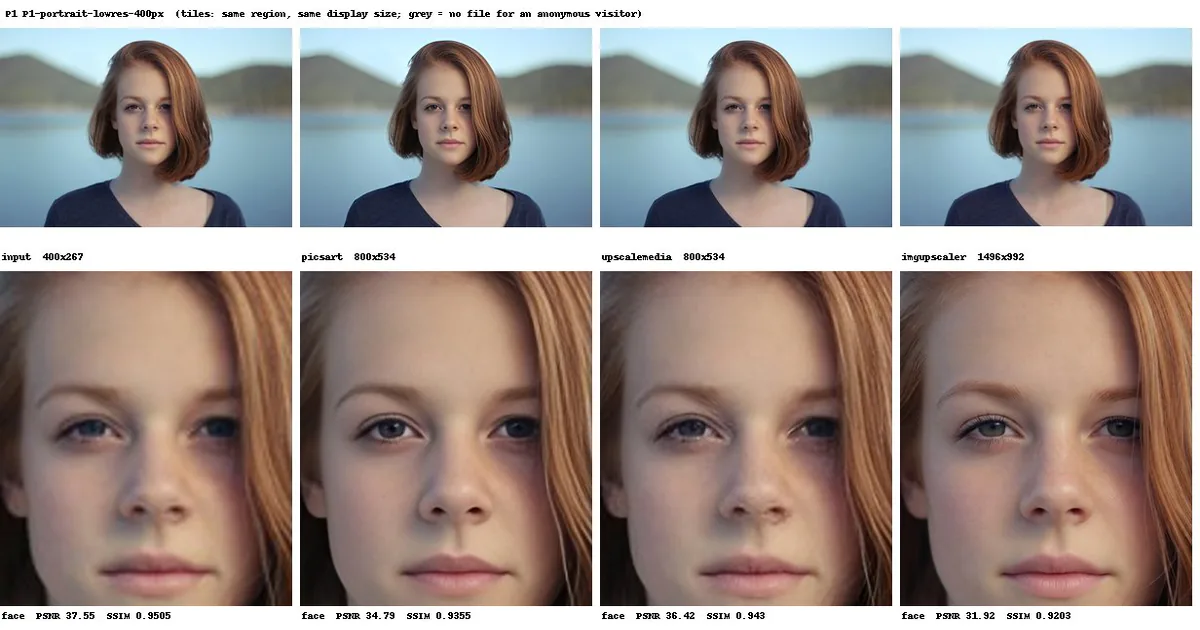
Which free AI photo enhancer can you use without an account? On October 10–11, 2026 (UTC), we ran eight tools on the same four photos as anonymous visitors — all defaults — and tried to download every result. Of the seven third-party tools, three handed over the complete file: Picsart, Upscale.media, imgupscaler.ai. Two delivered nothing without registration: PhotoGrid and Fotor.
An honesty note first: we build Retouchly, one of the eight. Under the rules below it placed fourth, and there it stays — drawbacks listed as plainly as everyone else's.
Quick comparison
Rules, applied to everyone including us: whether an anonymous visitor can take the processed file home — a full result beats a shrunk or sign-up-gated one, which beats nothing; how many of the four images ran before a limit; median time as tiebreaker only, since each site's timer starts differently. Quality does not affect rank.
| Rank | Tool | Without an account | Processed | Median time | Output | Watermark |
|---|---|---|---|---|---|---|
| 1 | Picsart | Full result on download; 4,096 px long-edge cap | 4 of 4 | 5.5 s | 2× | None |
| 2 | Upscale.media | 2× result, direct download | 4 of 4 | 12.5 s | 2× | None (C2PA AI credential) |
| 3 | imgupscaler.ai | Direct download; ~1.47 MP cap | 4 of 4 | 13.4 s | ~1.47 MP cap | None |
| 4 | Retouchly | Direct download; 2,048 px long-edge cap | 3 of 4 | 8.4 s | 2,048 px cap | None (C2PA credential) |
| 5 | Pixelcut | 1,080 px preview; full size = free account | 4 of 4 (Enhance 0 of 2) | 4.2 s | 2× | None |
| 6 | ZEnhancer | A download, not enlarged | 2 of 4 | 42–131 s | No larger than input | None |
| 7 | PhotoGrid | Nothing; download needs an account | 4 of 4 | 14.3 s | Up to 5,120 px (large inputs cut to 1,280 px, then 4×) | Preview-only label |
| 8 | Fotor | Nothing; even low-res needs an account | 1 of 4 | 9.5 s (one run) | 2× | None |
How we tested
The four photos: a 400×267 low-res portrait (P1, an Unsplash photo downscaled by us), a damaged 1,373×2,200 old-photo scan from Wikimedia Commons, public domain (P3), a 933×1,400 portrait blurred by us with a Gaussian filter (P4), and a 1,600×1,067 face-free Unsplash landscape (P5). A fifth, larger sample stayed out: 2,397 px long edge would have hit free-tier input caps and turned this into a size test.
Every tool got the same four files, uploaded anonymously — we never signed in anywhere, including on our own site — each on its landing-page default mode, one run per image plus audit re-runs. Times came from browser network timings; sites start the clock at different moments, so seconds are approximate. Our browser profile was persistent, not fresh per site — we report what we observed, not published rules. Every quota is a snapshot of those two days; these terms change often.
1. Picsart: the full result, no account needed
Picsart's AI Image Enhancer processed all four images without showing us a limit and hands over a full-size file: the free "Low-res" download equals the processed image, capped at 4,096 px on the long edge. Our small portrait came back at 800×534, the old photo at 2,556×4,096 (the processed image was 2,746×4,400, so the cap trimmed it). The further 2× "HD" download — up to 5,112×8,192 on the old photo — requires a Pro plan. Our download audit confirmed the free sizes. Median time was 5.5 seconds, with no watermark. Blurry faces get noticeably sharper, but eyes and brows can end up looking painted rather than photographed. One quirk: refreshing the page restores the previous result — dismiss it before the next upload.
2. Upscale.media: faithful, and that is the limit
Upscale.media does one thing for anonymous visitors: a straight 2× enlargement (4× and 8× are premium; "Enhance Quality" ships off — we changed nothing). Downloading needs no account. All four processed in a median 12.5 seconds, about 39 for the old photo; the page states a 5,000×5,000 guest input maximum. It does not deblur: the blurred portrait came back simply larger, still blurred — it altered our photos least of the six we could compare, and our P1 audit file matched the on-page result byte for byte. The page states no run limit: our fifth anonymous run was the last free one, and the sixth demanded an account (the prompt offered three more for signing up). Files carry an invisible C2PA credential marking them AI-generated.
3. imgupscaler.ai: the best-looking inventions
imgupscaler.ai gives anonymous visitors a direct download, running on credits — 10 a day, one per image; our four photos left 6. Median time: 13.4 seconds. Free output is capped near 1.47 megapixels, so both large inputs came back smaller than we sent them: the 1,373×2,200 old photo returned at 960×1,536, the 1,600×1,067 landscape at 1,496×992. Re-running the same file gives slightly different dimensions and visibly different content — not reproducible. Its texture is the most photographic of the six we could compare, and on the blurred portrait it came closest to real skin — but the details are invented. Wrinkles appeared that the original never had, and the old photo was repainted into a new, blue-eyed person whose dress changed colour between runs.
4. Retouchly: ours, and fourth for a reason
Full disclosure: we build Retouchly. It processed 3 of 4 — anonymous visitors get 3 free runs a day, and the fourth image was blocked with "Today's free runs are used up … Today: 0/3 free runs remaining."
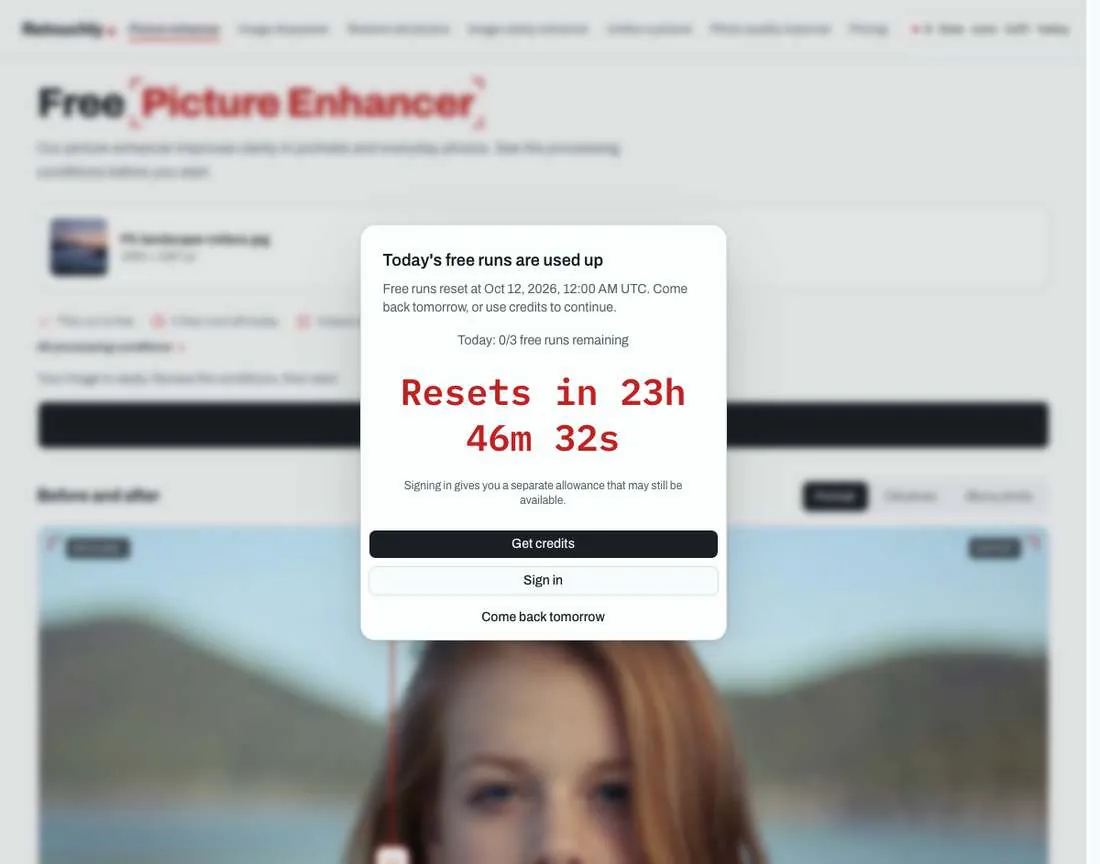
Downloads need no account. Median time was 8.4 seconds, third-fastest of the eight. Free output caps at 2,048 px on the long edge (paid: 4,096): the small portrait was enlarged 4× to 1,600×1,072, the blurred portrait stayed at roughly input size (944×1,408), and the old photo came back smaller than its input at 1,280×2,048. It produced the strongest deblurring in this test — individual brow hairs, natural eyes, same person — but it adds skin texture the original never had (freckles, pores), and left the old photo's damage untouched. Files embed a C2PA "AI-generated" credential signed by our processing provider, fal.ai, and an earlier internal test found small faces can still get swapped. The P5 file below came from a second guest session via the same public API; the ranking still counts 3 of 4.
5. Pixelcut: fast, with a funnel
The Enhance mode of Pixelcut's Photo Enhancer failed twice with "We could not analyze this photo." (a 200 response with an empty body), so we tested the same site's Image Upscaler on its default Fast Upscale 2× — fastest of the eight at a median 4.2 seconds, all four images processed. Downloading is where the funnel starts: anonymous users get a "Preview resolution" file capped at 1,080 px on the long edge — 674×1,080 on the old photo — while the full-size file is labelled "Free with sign in" (the small portrait fit under it at 800×534). Two more gates: the old photo's 2,746×4,400 result was too large even for a preview — an "Image larger than 4K" dialog demanded Pro — and after three preview downloads, the next attempt showed "Sign Up or Log In."
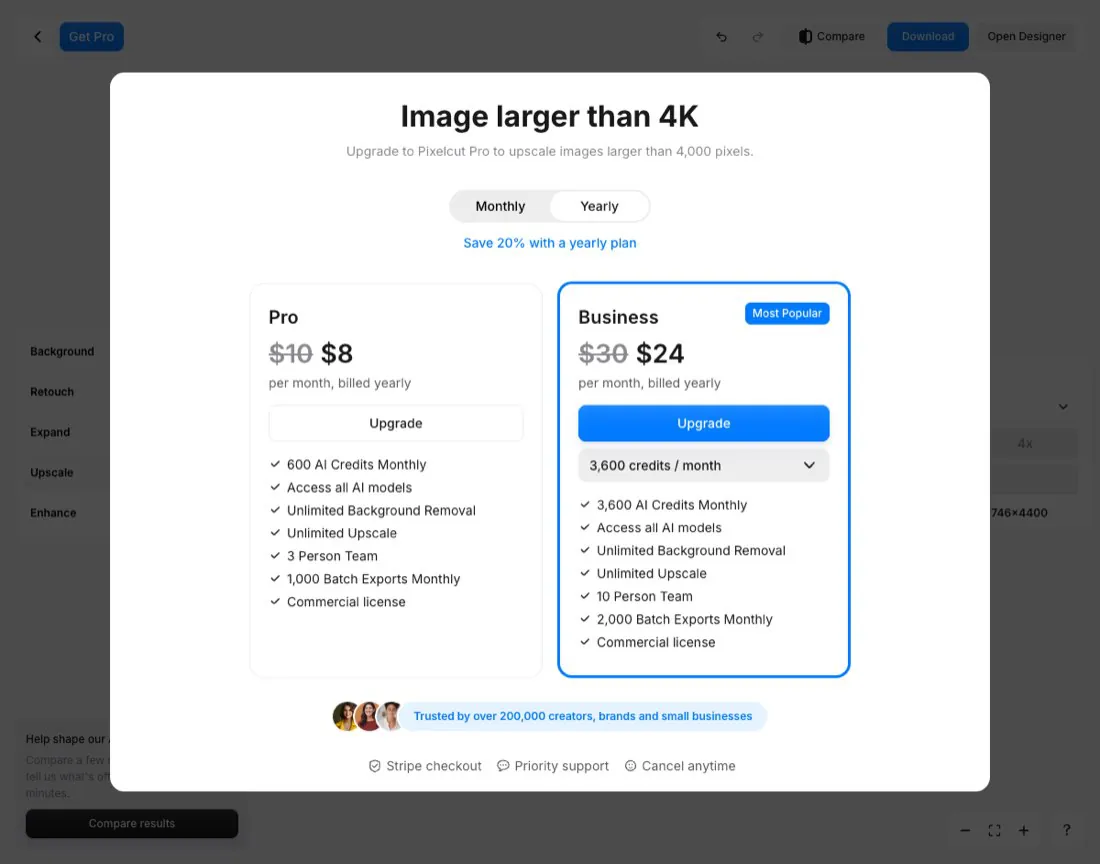
Output was near-identical to Picsart's throughout.
6. ZEnhancer: a download that is not an enhancement
ZEnhancer — not at zenhancer.com, which is parked — advertises "10 free daily credits, no sign-in," but each image costs 4 credits: two images a day. We processed 2 of 4 before it stopped us with "This edit needs 4 credits. You currently have 2." Jobs queue on their servers; one run took 42–46 s, the other 106–131 s. The deeper problem is what arrives: the preview showed 1,536×1,024, but the downloaded file was a 400×267 JPG — exactly the input size. The page does print "Processed size 28 KB," easy to miss. On the old photo the download matched the preview at 1,024×1,536, still smaller than the input. Processing recolours aggressively too: on the portrait (P1), the lake turned bluer, the mountain greener, the background partly repainted.
7. PhotoGrid: the biggest output you cannot have
PhotoGrid produced the largest outputs of the test — the landscape at 5,120×3,416 — by shrinking input to a 1,280 px long edge, then enlarging 4× (our small portrait, under the cap, came out at 3,200×2,136). Standard Enhancement is the default; Ultra HD and Restoration are Pro tiers. All four images processed in a median 14.3 seconds, and none is downloadable without an account: "HD Download (up to 1920px)" opens a sign-up modal (Google, Apple, or Email); "4K Download (up to 4096px)" requires VIP. An "Upgrade to PhotoGrid PRO" dialog covers every result; the page advertises "100% FREE, No Watermark."

The "PhotoGrid" text sits on the page preview, not inside a file. We could not rate its quality; it ranks here because nothing is downloadable without an account.
8. Fotor: one image, zero files
Fotor's AI Image Enhancer processed exactly one of our images without an account, in 9.5 seconds at 2× (800×534 from 400×267). Both download buttons — "Low-res" and the Pro-gated "HD" (1,600×1,068) — opened a "Get Started with Fotor" sign-up modal, so the finished result was never delivered.

On the second image the site returned an error saying the request limit had been exceeded and asked us to log in: 1 of 4 processed, 0 delivered; we did not run the remaining two against the same wall. Our browser profile was not factory-fresh per site, so the one-run figure is what we observed that day, not a documented Fotor rule. The result page itself showed no watermark — small comfort when no file is delivered.
Image quality: side by side
The sheets compare only what an anonymous visitor can walk away with; PhotoGrid and Fotor are absent — no file; grey tiles mean no file for that photo. Same crops, same display size — a small free output looks softer here: that is genuinely all you get.
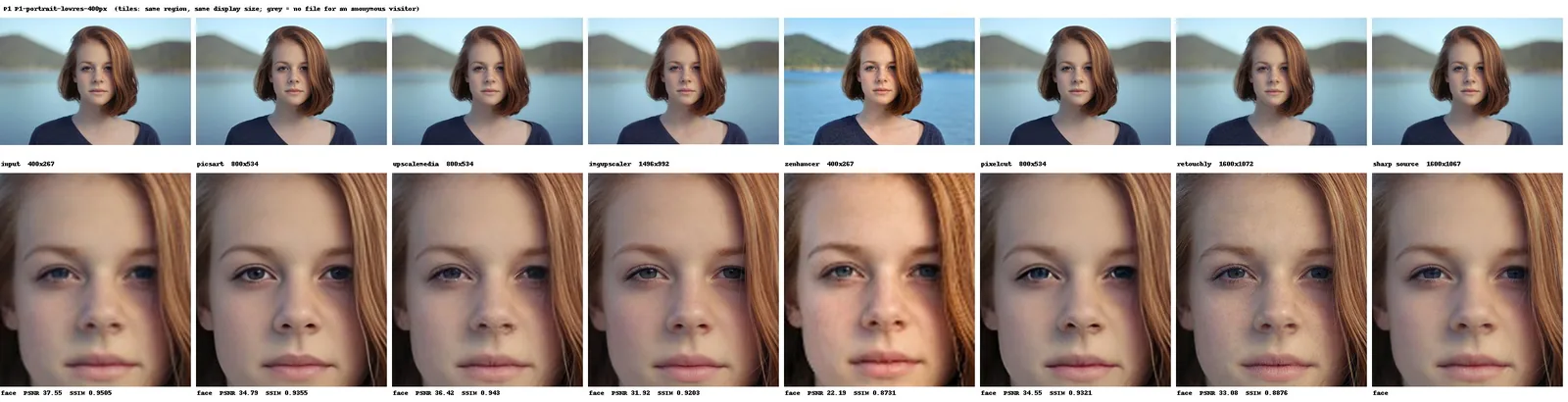
Upscale.media is nearly indistinguishable from the input. Picsart and Pixelcut sharpen the face convincingly; imgupscaler.ai looks sharpest — the detail is invented. Retouchly is the sharpest result that is still the same person, freckles added. ZEnhancer's download never enlarged the photo and recoloured it.
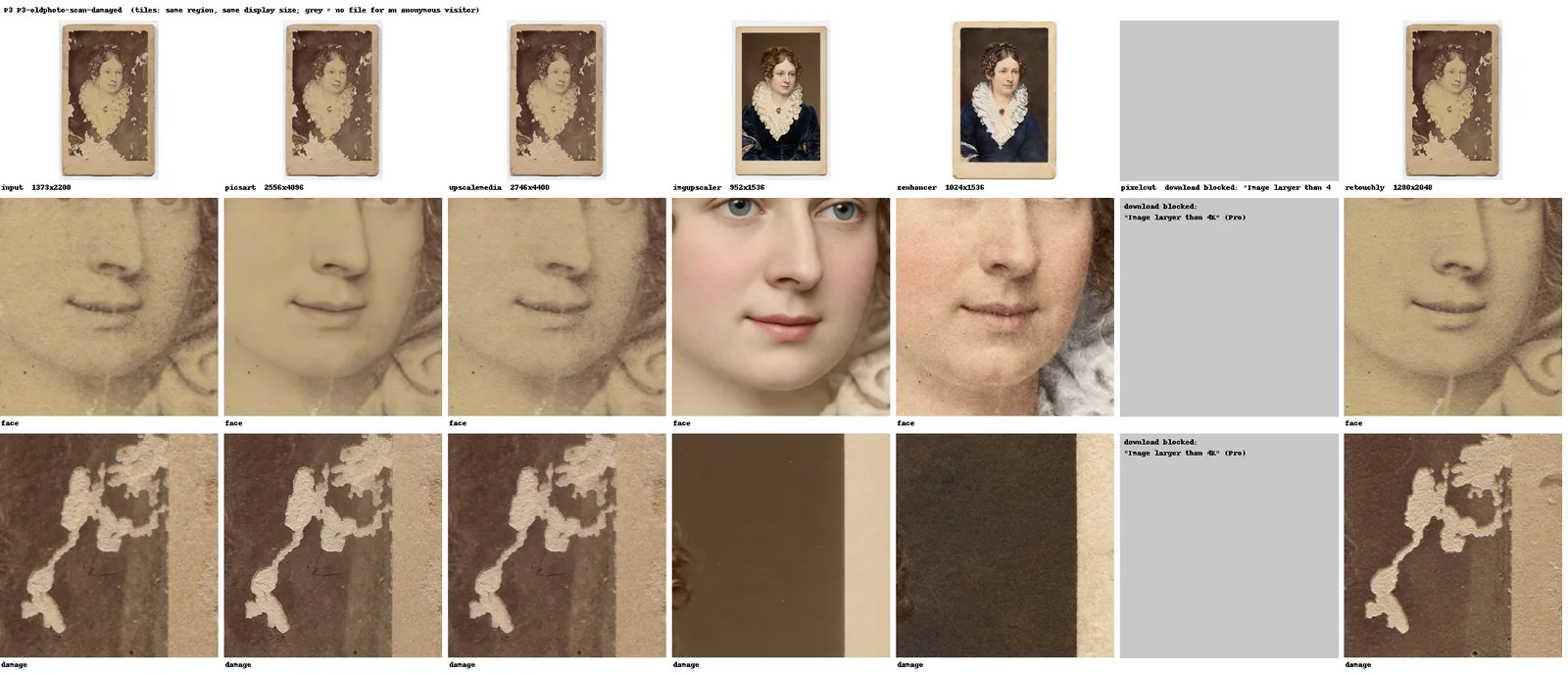
Picsart, Upscale.media, and Retouchly leave every piece of damage — stains, missing emulsion, card edges — where it was, sharpening gently at best. imgupscaler.ai and ZEnhancer repaint it: colourized, a new face (blue-eyed in imgupscaler.ai's run), damage erased. That is replacement, not restoration — and imgupscaler.ai changed the dress colour between runs.
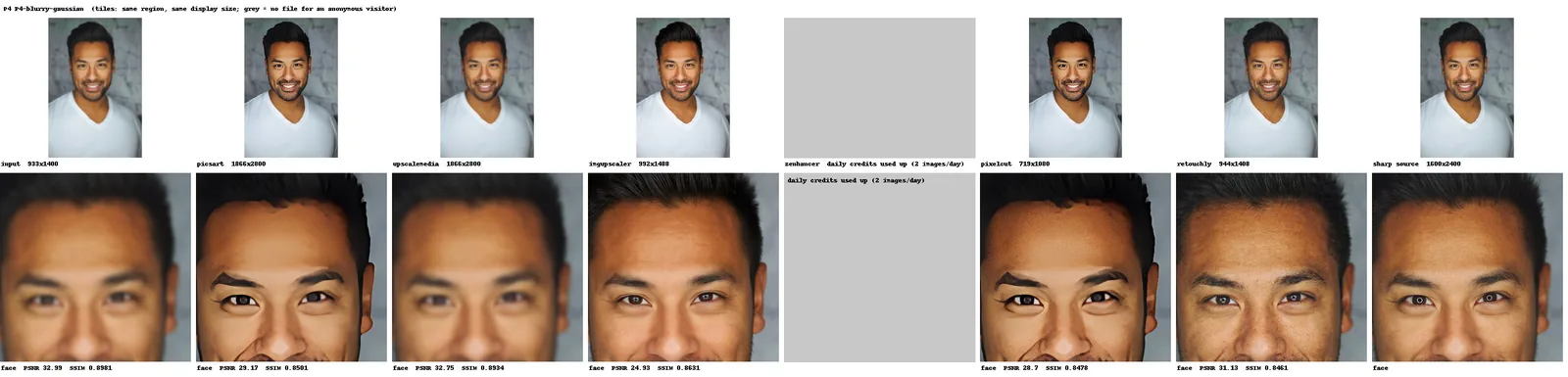
Retouchly resolves individual brow hairs and keeps the face recognisable, adding pore-level texture the original lacked. imgupscaler.ai comes closest to real skin but adds a forehead wrinkle from nowhere. Picsart and Pixelcut sharpen strongly but paint the eyebrow into a block and over-brighten the eyes. Upscale.media returns the blur unchanged.
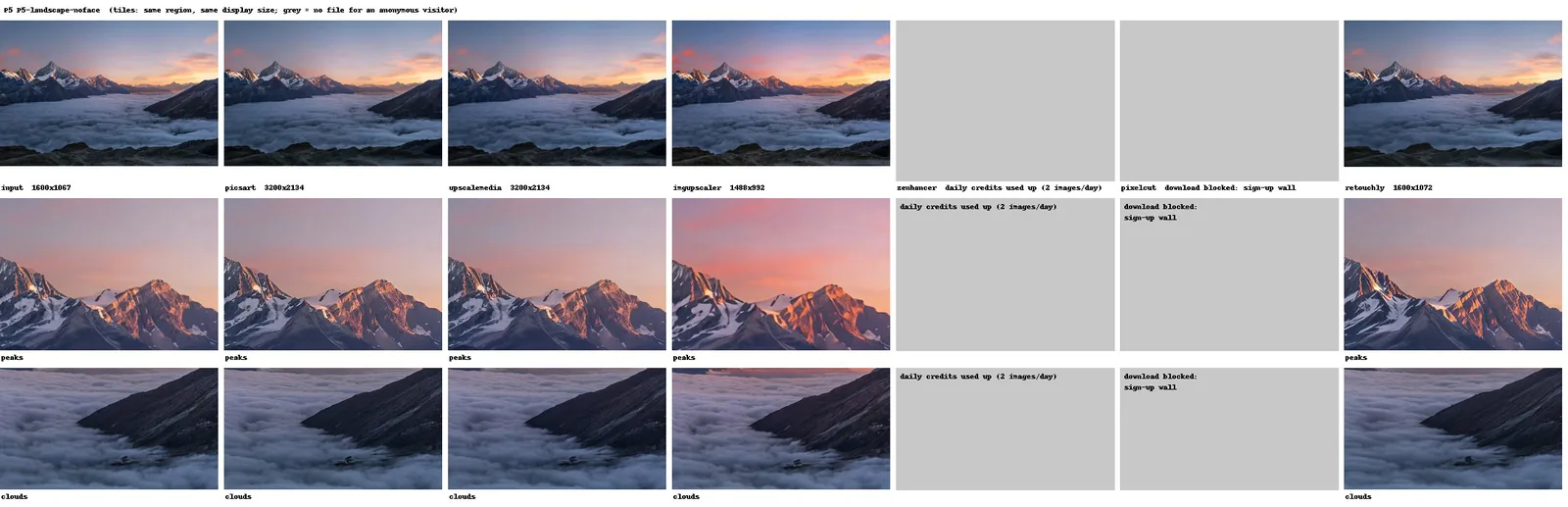
Most outputs stay close to the input; Retouchly's is not enlarged, and imgupscaler.ai comes back smaller than it went in, sharpened and pinker. No tool won every photo, including ours — and the most convincing-looking result is often the one that invented the most.
What the similarity scores say
P1 and P4 have sharp originals, so we also computed whole-image PSNR and SSIM against them (outputs resized to source size; higher is closer):
| Sample | Input enlarged (baseline) | Picsart | Upscale.media | imgupscaler.ai | Pixelcut (preview) | ZEnhancer | Retouchly |
|---|---|---|---|---|---|---|---|
| P1 | 37.55 / 0.951 | 34.79 / 0.936 | 36.42 / 0.943 | 31.92 / 0.920 | 34.55 / 0.932 | 22.19 / 0.873 | 33.08 / 0.888 |
| P4 | 32.99 / 0.898 | 29.17 / 0.850 | 32.75 / 0.893 | 24.93 / 0.863 | 28.70 / 0.848 | no file | 31.13 / 0.846 |
Treat them as a side signal that never decides ranking: the scores reward changing nothing — no tool beat plain enlargement, and Upscale.media's top score records how little it changed. imgupscaler.ai has the lowest PSNR on the blurred portrait because generated texture never lines up with source pixels; Retouchly's SSIM drops for the same added texture; ZEnhancer's P1 is worst mainly from recolouring. They measure change, not correctness.
"Free" and "no sign-up" are different things
All seven third-party landing pages said "free." Three delivered the complete result anonymously: Picsart, Upscale.media, imgupscaler.ai. The gap between word and button is where the facts live:
- The label can mislead. PhotoGrid advertises "100% FREE, No Watermark" — its download button opens a sign-up modal. Pixelcut's "Free HD Download" is a 1,080 px preview anonymously; full size is "Free with sign in."
- Processed is not delivered. PhotoGrid generated the test's largest file — 5,120×3,416 — and delivered zero bytes of it without an account.
- Caps can shrink large photos. imgupscaler.ai and ZEnhancer cap free output near 1.5 MP, ours at 2,048 px — three of the eight returned our old photo smaller than we sent it.
- No visible watermarks, but invisible labels. Every downloaded file was watermark-free; Upscale.media and Retouchly embed invisible C2PA credentials that some platforms may surface as an AI label.
FAQ
Which AI photo enhancer is free without sign-up?
Four counting ours; three third-party: Picsart (free download at the processed size, 4,096 px long-edge cap), Upscale.media (2× result, direct download), and imgupscaler.ai (direct download, capped near 1.47 MP — possibly smaller than your input). Retouchly also downloads without an account but stopped at 3 of 4 on its daily limit; ZEnhancer downloads too, but its file was not enlarged.
Do free AI photo enhancers add watermarks?
None of the files we downloaded had a visible watermark. PhotoGrid's name sits on its page preview, not in a file — and it delivers no files without an account. Upscale.media and Retouchly embed invisible C2PA credentials; some platforms may show an AI label.
Is a bigger output always better?
No. The similarity scores rewarded changing nothing: the least-changed tool scored highest, no enhancer beat plain enlargement, and the most realistic texture scored the lowest PSNR because it was generated, not recovered. Three tools also returned our old photo smaller than we sent it.
Can free AI tools restore old, damaged photos?
Not here. Picsart, Upscale.media, and Retouchly sharpened gently and left all damage in place; imgupscaler.ai and ZEnhancer repainted the photograph as a new, colourized person — useless for family archives, because the person is the point.
Why does Retouchly rank fourth if you build it?
Because the ranking measures what an anonymous visitor takes home, not who makes the prettiest picture. Rule 2 decides it: Retouchly processed 3 of 4 before its daily limit blocked the fourth run. Separately, it caps free output at 2,048 px, adds skin texture, leaves damage untouched, and embeds an AI-content credential. On deblurring faces it did the best work here — above the tools that never deliver a file, below the three that processed all four images.
Which one for which photo
- No account, file now. Picsart: full processed size (4,096 px cap), no watermark, no limit hit. Upscale.media for strictly faithful 2×; imgupscaler.ai if a small input keeps it under its ~1.47 MP cap and you accept invented detail.
- An account is fine. PhotoGrid: a free account unlocks downloads up to 1,920 px; 4,096 px needs VIP. Pixelcut for speed (median 4.2 s); full size is labelled free with sign-in.
- Blurred photo. Retouchly did the strongest deblurring here while keeping the person recognisable; imgupscaler.ai is the texture-first alternative that invents details.
- Damaged scan. None of the five tools that gave us the old photo back repaired the damage; two "fixed" it by replacing the person.
To try it on your own photo: Retouchly's picture enhancer, no account, 3 free runs a day.